 51
51
FiveM vehicle
FiveM vehicle category
A vehicle pack can solve a complete fleet gap in one purchase, but its value depends on how much of it your server will actually use. Compare the included models, shared systems, catalog overlap and rollout cost before treating the vehicle count as the answer.
Available now
51
 49
49
 23
23
 93
93
 80
80
 93
93
 53
53
 93
93
 10
10
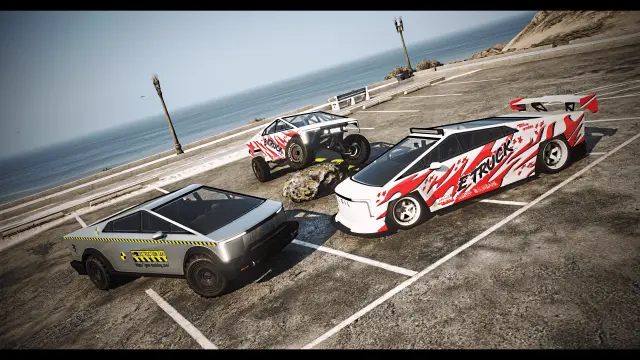
The Coil E-Truck Pack brings scratch-made electric pickups to FiveM in three trims (OEM, DRT and CTX), with 106 tuning parts, custom sounds by Legacy_DMC, paintable DRLs and dedicated truck handling.
 36
36
 29
29
 31
31
 43
43
 08
08
Vehicle packs range from focused pairs and model families to emergency fleets and catalog-sized bundles. The right size is the one that closes a defined gap. A matching truck family can stock a rural dealership. A police pack can standardize a department. A broad civilian bundle can replace a thin launch catalog, but only if its performance tiers and visual style match the economy you are building.
Write down the roles you need before comparing packs. Count starter cars, family vehicles, work vehicles, performance tiers and restricted emergency units separately. Then map every included model to one of those roles. Vehicles with no destination are not extra value. They are extra download size, setup time and testing.
Do not add a large pack to every dealership in one afternoon. First record the compressed download size and inspect the model and texture files. Review LOD information where it is published. Then introduce a small representative group on staging: one ordinary car, one detailed hero vehicle, one model with many tuning parts and any trailer or emergency unit with extra functionality.
Build price tiers before import. Bulk insertion with arbitrary prices creates a showroom where a work van, sports coupe and specialist truck all cost the same. That makes the catalog large without making progression deeper. Assign each model a class, purchase price, finance rule, trunk capacity and access policy deliberately.
A practical rollout starts with the vehicles needed for active jobs and the public dealership. Let players use them for a full restart cycle. Watch garage persistence, display names, texture loading, handling complaints and crash reports. Add the next group only after the first is stable.
Keep the original resource archive and a list of every spawn code you enabled. If one model causes trouble, a modular list lets you remove it without guessing which dealership, garage and job configs reference it. Never delete an owned vehicle from the live server before deciding how its database records will be migrated or refunded.
Pure vehicle resources are generally independent of ESX, QBCore and Qbox. The framework work happens in your dealership, garage, keys, fuel and job configs. Install the files in resources, start the supplied resource names through server.cfg, and follow any documented order for shared libraries. Do not merge metadata files unless the pack specifically requires it.
After installation, test purchase, storage, modification, transfer, impound and restart persistence. Check trailers, seats, doors, liveries, lights and moving parts on the models that use them. A pack is production-ready when the entire enabled subset works through your server systems, not when every spawn command succeeds once.
Questions about Vehicle Packages
It can be when most included vehicles fill real gaps in your fleet. Compare the exact model list and your existing spawn codes; unused or duplicate vehicles still add setup and streaming work.
Pure add-on vehicle packs are normally framework-independent. You must still configure their spawn codes, prices and classes in your framework's dealership, garage, keys and job systems.
Not necessarily. If the pack is modular, enable only the groups your server needs and add more after testing. Check the licence and documentation before altering or separating the delivered resources.
Compare its documented spawn names and model roles with your installed vehicle list. Also check shared handling names, modkit IDs and sounds so a differently named folder does not hide a technical collision.
Start with a representative group on staging, run it through purchase, tuning, storage and restart tests, then add categories in phases. Keep a deployment list so any failing model can be traced and removed safely.
Useful details include LOD coverage, YFT and YTD sizes, texture resolution, polygon counts and the number of separate resources. Your final decision should include a multi-vehicle client test on hardware close to your minimum target.